Windows 95 turns 31 and RetroMac 2.7 brings back the Fun Stuff folder
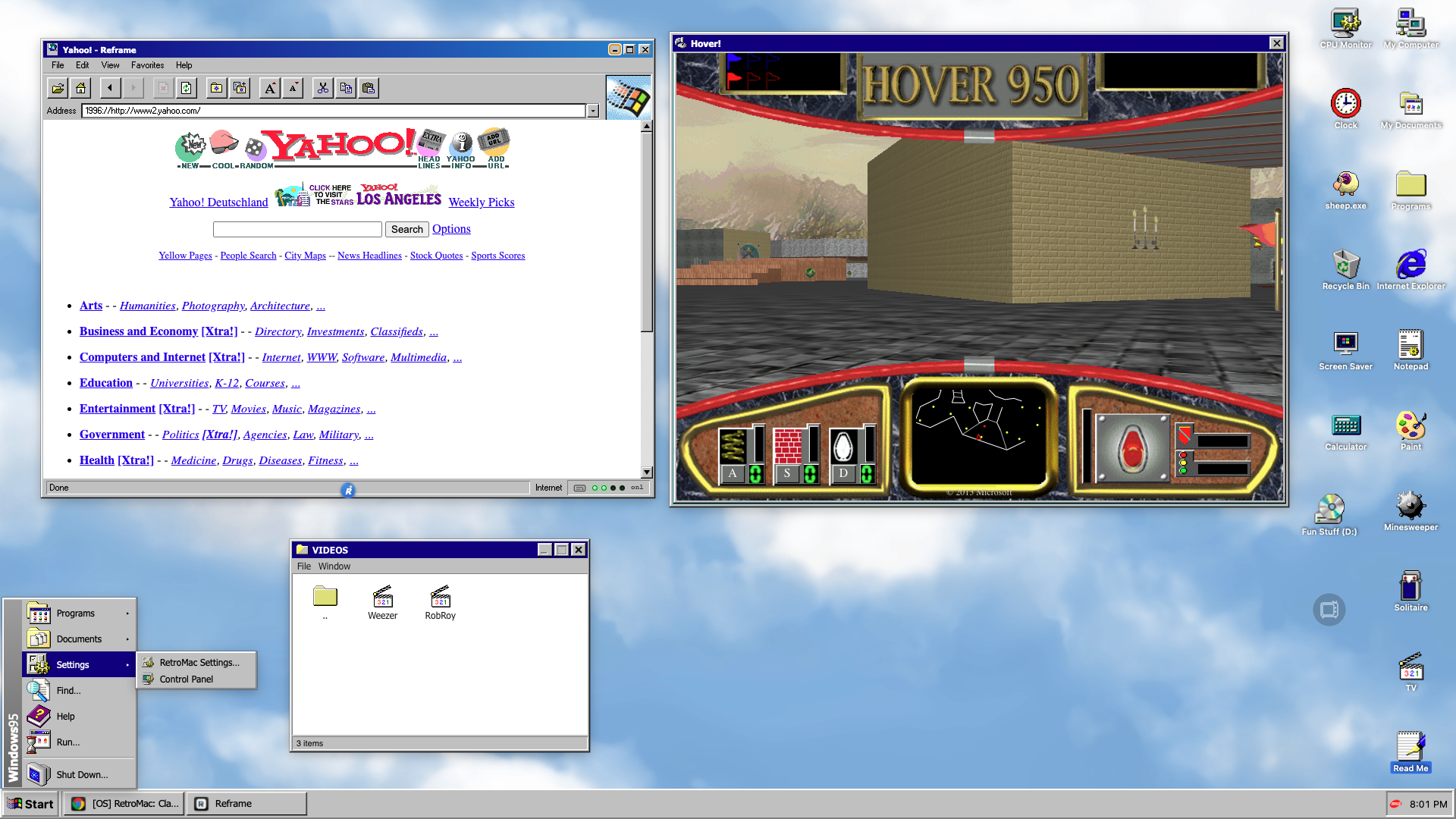
Thirty-one years ago, on 24 August 1995, people queued at midnight to buy an operating system. Not a phone. An operating system. Microsoft licensed "Start Me Up" from the Rolling Stones, lit up the sky, and sold Windows 95 like a blockbuster. It worked.
But the part I keep coming back to isn't the Start menu. It's a folder on the CD that most people never opened.
The Fun Stuff folder
Windows 95 shipped on floppies and on CD-ROM. The CD held around 650 MB, the install needed a fraction of that, and instead of shipping air, Microsoft filled the rest with a folder called FUNSTUFF.
What was in there:
→ Hover!, a full game → Weezer's "Buddy Holly" video, directed by Spike Jonze → Edie Brickell's "Good Times" → The trailer for Rob Roy → A handful of "Welcome" clips → And 64 sound files from Hover!, just sitting there
Think of it as the bonus DVD nobody asked for, bundled with your operating system. Microsoft's own Raymond Chen wrote up the licensing story earlier this year — getting a major-label music video onto an OS install disc was exactly as awkward as it sounds.
Software doesn't do this anymore. Your OS update ships release notes. In 1995 it shipped a music video.
Hover!
Hover! is bumper cars crossed with capture the flag. You steer a hovercraft through three mazes — a castle, a future city, a sewer — grab flags, get rammed by the AI, collect power-up orbs.
It was a tech demo dressed as a game. CD-ROM multimedia was the new thing and Hover! was there to prove your beige tower could do it. Microsoft thought enough of it to rebuild it in WebGL for Internet Explorer 11 in 2013.
It still holds up. Not because it's a good game — because of the sound design and the fact that it runs at all.
What's new in RetroMac 2.7
The Windows 95 theme is live. Start button, taskbar, the grey window chrome, the whole 3D-bevel-on-everything look that defined a decade of computing.
And it ships with a Fun Stuff folder. Hover! is in there. So are the videos. Same folder, same idea, on a Mac.
Nothing gets patched, nothing gets replaced. RetroMac paints over your screen and you turn it off whenever you're done.
The setup, start to finish
Step 1 — Pick the theme
Update to 2.7, click the RetroMac icon in the menu bar, choose Windows 95. Taskbar and Start button appear, window chrome goes grey.
Step 2 — Open Fun Stuff
The folder sits on your desktop. Hover! and the videos are inside. This is the part where you lose twenty minutes.
Step 3 — Fix the browser
This is the step most people skip, and it's the one that sells the whole thing. A pixel-perfect Windows 95 desktop with a 2026 browser on it looks like a stage set with a fire exit in the shot.
Reframe fixes it. It's a free, open-source browser with a modern Chromium engine and 20+ classic skins. Pick Internet Explorer 1.0 — it shipped in August 1995 with Microsoft Plus!, the same summer as Windows 95. That's as period-correct as it gets.
If IE 1.0 feels too spartan, IE 3.02 or IE 4 give you the same era with more toolbar.
Step 4 — The last five percent
Set the wallpaper to the Windows 95 clouds, or just go with the teal. Turn the system sounds on. Nobody needs the startup chime. Everybody wants it.
Wrap-up
Nostalgia usually gets sold as a filter — a bit of grain over something that works exactly like it did before. This is different.
Windows 95 wasn't beautiful. It was grey, boxy, and it crashed. But somebody at Microsoft decided the install disc should have a game and a Weezer video on it, and shipped it that way to millions of people.
That's the part worth copying. Not the bevels — the willingness to put something pointless in the box.